
Custom CSS

Introduction

CSS lets you customize the style of your survey, including colors, typography, and other branding elements. Custom CSS is available to users with active subscriptions.

To add CSS, navigate to the Style tab and open the Custom CSS section.

Numerous online resources are available to help you learn CSS and implement changes to your surveys.
Navigate to settings and then custom code.

Classes

Classes target specific elements on the page. The documented classes below are supported and maintained. Other classes found through browser inspection may change without notice and are not guaranteed to work across updates.

Each section below includes an image showing which elements the classes target, along with the class names for easy reference and copying.

General

These classes apply to all questions.

A survey question with classes highlighted. Use the browser tools in your survey to find desired classes.
.mobile(≤833).desktop (≥834)
.question-width-container
.survey-header
.question
.question-error
.question-text
.navigation
.button
.back-button
.next-button
.survey-progress

Note: .question-width-container changes the width of all questions in the survey. CBC and grid questions use additional classes to handle their dynamic content — if you use this class, verify those question types appear as intended.

Constant sum

A survey question with classes highlighted. Use the browser tools in your survey to find desired classes.
.responses
.numeric-input-label.start-input-label
.numeric-input-label.end-input-label
.constant-sum-response
.list-item-[list item #]
.numeric-input
.response-label
.total-area
.total-box

Grid

A survey question with classes highlighted. Use the browser tools in your survey to find desired classes.
.question-width-container
.grid-header
.grid-column-label
.grid-row.error.grid-row-item-[list-item #].grid-row-[grid row #]

Mobile view

A survey question with classes highlighted. Use the browser tools in your survey to find desired classes.
.grid-header
.grid-row-label
.grid-response.grid-column-item-[list item #].grid-column-[grid column #]
.grid-column-label
.grid-row.error.grid-row-item-[list item #].grid-row-[grid row #]
.radio/.checkbox

Numeric grid

Numeric Grid CSS classes
.numeric-input-label.start-input-label
.numeric-input-label.end-input-label
.numeric-input

Bipolar grid

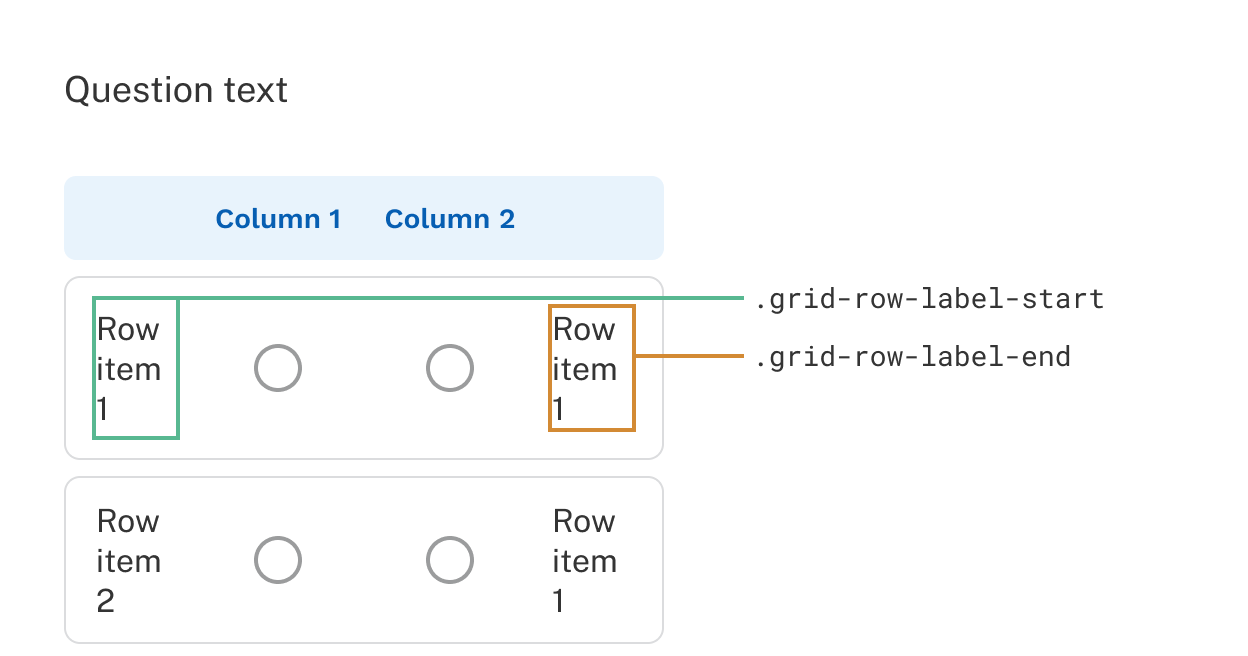
A bipolar grid with its CSS classes highlighted.
.grid-row-label-start
.grid-row-label-end

Mobile view

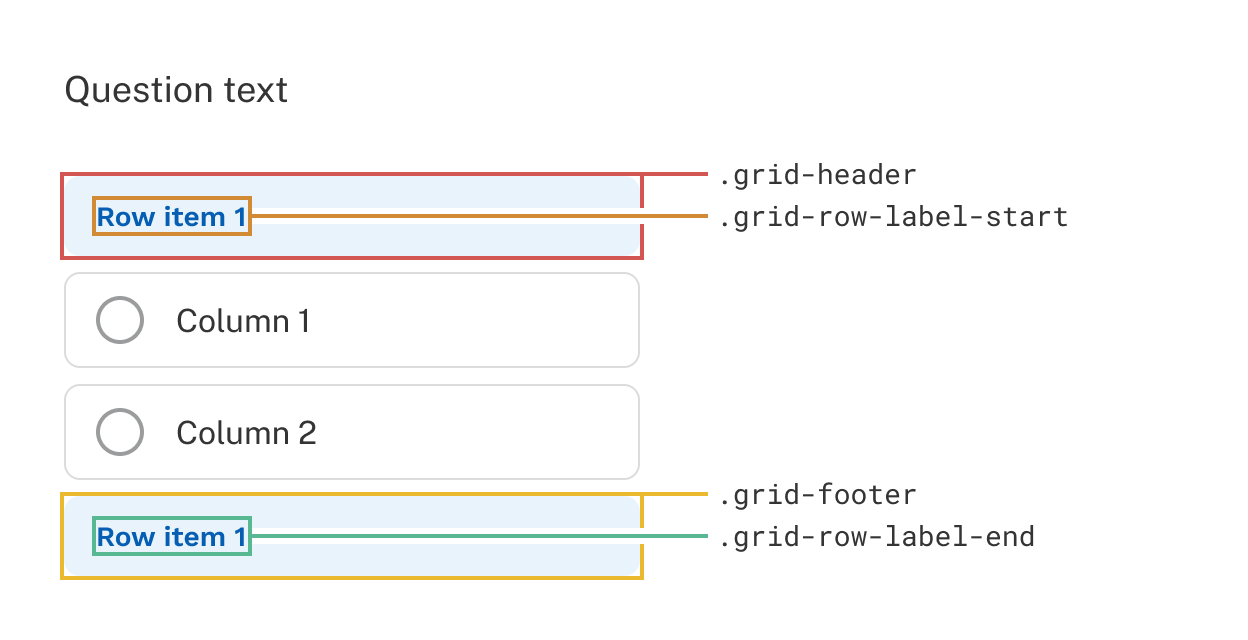
Grid - Mobile bipolar
.grid-header
.grid-row-label-start
.grid-footer
.grid-row-label-end

Multiple choice

Multi-select

A survey question with classes highlighted. Use the browser tools in your survey to find desired classes.
.responses
.multi-select-response
.checkbox
.list-item-[list item #]
input[type=”checkbox”]
.response-label.checkbox-label

Single-select

Single Select
.responses
.single-select-response
.radio
.list-item-[list item #]
input[type=”radio”]
.response-label.radio-label

Single-select dropdown

Single Select Dropdown CSS classes
.dropdown.collapsed/expanded
.dropdown-container
.dropdown-option
.list-item-[list item #]
.dropdown-option.selected

Numeric

Numeric
.numeric-response.numeric-input
.numeric-input-label.start-input-label
.numeric-input-label.end-input-label

Open-end

Single-line

Single Line Open End
.single-line-response.text-input

Multi-line

A survey question with classes highlighted. Use the browser tools in your survey to find desired classes.
.multi-line-response.text-input

Ranking

A survey question with classes highlighted. Use the browser tools in your survey to find desired classes.
.drag-target-container
.response-label
.dropdown-icon
.drag-handle
.drag-target
.drag-source
.ranking-response
.draggable-item
.list-item-[list item #]
.dropdown.collapsed/expanded
.dropdown-container
.dropdown-option.selected
.dropdown-option

Text entry

A survey question with classes highlighted. Use the browser tools in your survey to find desired classes.
.text-entry-response
.text-entry-input

Choice-based Conjoint

A survey question with classes highlighted. Use the browser tools in your survey to find desired classes.
.question-width-container
.task-counter.question-width-container
.concepts-container.extended-content-width-container
.cbc-response.concept
.cbc-response.concept.selected
.cbc-cell.attribute-[attribute-#].level-[level-#]
.attribute-label
.response-label.level-label
.button.cbc-cell
.button.cbc-cell.selected
.none-option.question-width-container.cbc-response.concept.selected (if chosen)
.none-option-text

Note: CBC uses .extended-content-width-container instead of .question-width-container to manage dynamic concept widths. This class is also used for grid questions.

Cbc 2
.attribute-labels-column
.cbc-cell.attribute-[attribute-#]
.dual-response-none


Mobile CBC

A survey question with classes highlighted. Use the browser tools in your survey to find desired classes.
.carousel-progress
A survey question with classes highlighted. Use the browser tools in your survey to find desired classes.
.carousel-progress

MaxDiff

A survey question with classes highlighted. Use the browser tools in your survey to find desired classes.
.maxdiff-task-counter
.maxdiff-header
.best-label
.items-label
.worst-label
.maxdiff-row-label
.radio-container
.radio.best-input/worst-input
.maxdiff-response

Anchored MaxDiff questions use grid styles. If your MaxDiff includes an anchoring question, you can style it separately from other grid questions in your survey. To target it specifically:

[question="MaxDiff Name_anchor"] {}

Target a specific question

To apply styles to a single question rather than all questions using a class:

[question="Question name"] {}

Survey updates

Discover receives automatic updates regularly. When custom CSS or JavaScript is present, automatic updates are paused to prevent unintended interference with your code. Updates are applied the next time the survey is republished.

Before publishing, use the Test feature to run through any parts of your survey that include custom code and check for unintended interactions.

Note: To maintain safety and security, surveys with custom code that haven't been published in six months will be updated automatically to receive the latest improvements.