Design status

Introduction

A design is the combination of tasks and concepts that respondents see in a CBC exercise. To help prevent order bias and improve utility estimation, Discover generates multiple versions of a design so respondents receive different sets of questions. For example, a 20-version design produces 20 unique sets of questions that are assigned to respondents in rotation. Some respondents may see the same version, but strong balance is still maintained both within each version and across versions.

A valid design is required before you can publish your survey. The design status indicates whether your exercise is ready for data collection. A design is considered ready once it has been generated and tested. You can view the status in the Design tab of each CBC in your survey.

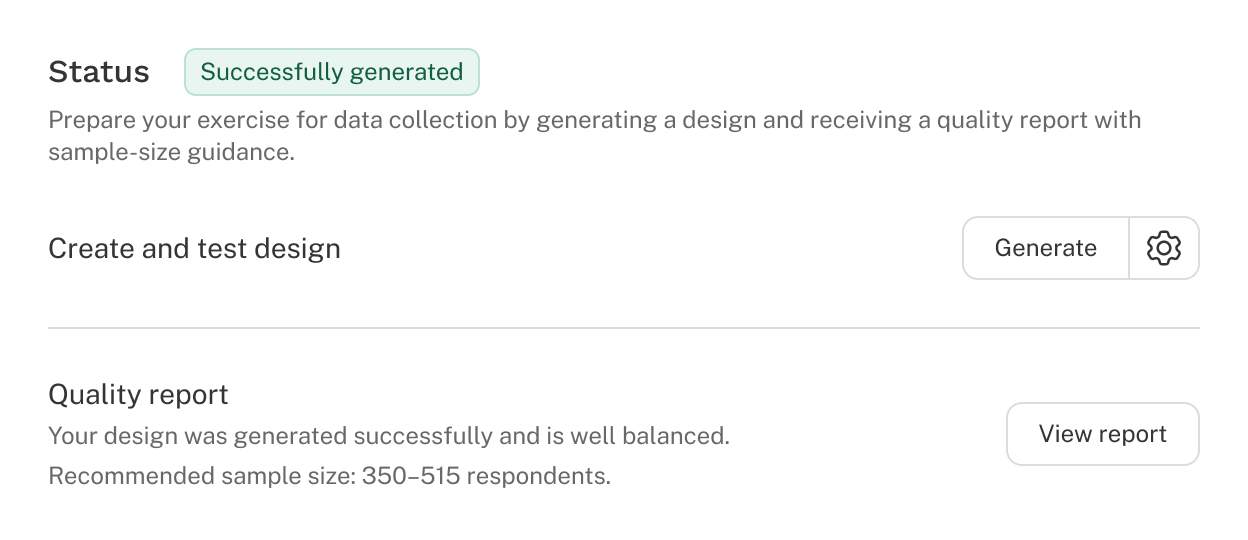
A successfully generated design status is shown

Design statuses

There are five possible statuses for design generation:

  • Successfully generated: The design has no concerns and is ready for data collection.
  • Warning: The design is usable but may result in poor utility estimation. Notes are included with suggestions for improvement (learn more below).
  • Unusable: The design cannot produce reliable utilities. Address the listed issues (learn more below) and regenerate the design.
  • Failed: The design could not be generated, typically due to too many prohibitions; try generating again. If it continues to fail, contact support.
  • Out of date: The generated design no longer matches the current exercise settings. Regenerate the design to ensure it accurately reflects the latest changes.

Design generation

To generate the design, click Generate in the Design tab. By default, Discover spends ~3 seconds per version. With the default of 30 versions, generation and testing take about 90 seconds. We recommend fielding multiple versions of the CBC questionnaire across respondents to account for psychological order effects and to increase overall design efficiency.

Note: Test survey does not require a pre-generated design. If you have not generated a design when you test your survey, Discover will create designs on-the-fly, meaning that as the test respondent starts the CBC questions, a unique design is created in that moment. If you have generated a design, the test will pull from those versions.

How the designer works

The designer selects which attribute levels to show across tasks with three main goals:

  • Each level of an attribute appears the same number of times.
  • Levels from different attributes appear together equally often.
  • Tasks and concepts are shuffled to improve:
    • Balance of levels appearing in each concept position (left, middle, right, etc.).
    • Distribution of attribute levels across tasks, avoiding repeats in back-to-back or nearby tasks.

A perfect balance isn’t always possible, but near-perfect CBC designs still perform very well and yield excellent results in practice.

Generation settings

The settings button (next to Generate) provides additional options to fine-tune the design.

Estimated percent answering “none”

This setting is available if your exercise includes a “none” option. Indicate the percentage of responses you expect to be “none.” This allows Discover to estimate, ahead of time, the precision you can expect in your utility estimates. Because “none” responses provide little information about preferences for other attributes and levels, a higher estimated percentage of “none” responses results in lower precision (higher standard errors). As a result, the design report will show higher recommended sample sizes to achieve the desired level of precision.

The default is 15%.

Design generation duration

Design generation duration controls how long the designer spends searching for an efficient CBC design. Design quality is evaluated across several factors, including one-way and two-way level balance, level overlap, and positional balance (both within and across versions). The designer works in stages of multiple passes through the design, relabeling or swapping attribute levels to improve quality. If improvement falls below the breakout threshold for a stage, the designer stops.

You can use this setting to allow the algorithm more time to search for a potentially more efficient design.

Default search time: By default, Discover’s CBC design algorithm completes multiple stages of 20 passes (iterations) through the design, performing relabels (within concepts) and swaps (between concepts). It stops when the most recent stage improves the design by less than 0.01 (1%).

Default designs are near-optimal for small to modest CBC exercises that do not use prohibitions.

Extended search time: This setting makes the designer search longer to potentially find a more efficient design. Each stage performs 100 passes (iterations), and the breakout threshold is 0.001 (0.1%).

For more complex studies or exercises with prohibitions, extended search time can produce designs that are 1–3% more efficient than default settings (based on internal testing).

Maximum search time: This setting makes the designer work even longer. Each stage performs 250 passes (iterations), and the breakout threshold is 0.00001 (0.001%).

For complex studies or those with prohibitions, maximum search time may produce designs that are 1–3% more efficient than default settings (based on internal testing), similar to the improvements seen with extended search time but with even more opportunity for refinement.

Design seed

Sets the random starting point (seed) used to initialize the design algorithm. Changing the seed produces a different design, though overall quality typically remains similar.

The default is 1.

Design testing

After versions are generated, Discover automatically tests your design. This helps you evaluate whether your exercise will provide enough information to estimate utilities with adequate precision.

Design report

Once testing is complete, a Quality report is created. This includes:

  • An assessment of design quality.
  • A recommended sample size range, based on standard errors at a given N.

The tables in the report provide different methods for checking whether your CBC design is balanced and precise enough to estimate utilities accurately. Use them together:

  • One-way metrics show how often each level appears.
  • Standard errors show whether that frequency is precise enough at your sample size.
  • Two-way balance checks how levels between attributes taken two at a time appear in combination.
  • Per-version counts confirm balance within versions (a version is the subset of tasks given to a single respondent).

Discover recommends a sample size range based on standard errors from pooled logit (MNL) analysis of simulated respondent data. The lower end of the range represents the minimum number of respondents needed for all levels (excluding the “none” option) to have standard errors ≤ 0.05. The upper end represents the preferred sample size, where all standard errors are ≤ 0.03.

Many formulas have been proposed in the literature for recommending sample size. In our experience, standard error guidelines of 0.05 to 0.03 for main effects (a practical Sawtooth rule of thumb forwarded by Bryan Orme) work well, as they incorporate design strength, sample size, and the number of tasks each respondent completes.

We should note that the sample size recommendations assume you're mainly interested in making inferences about the entire population. If your study aims to identify and model differences between segments, you should ideally have around 200 or more respondents per group.

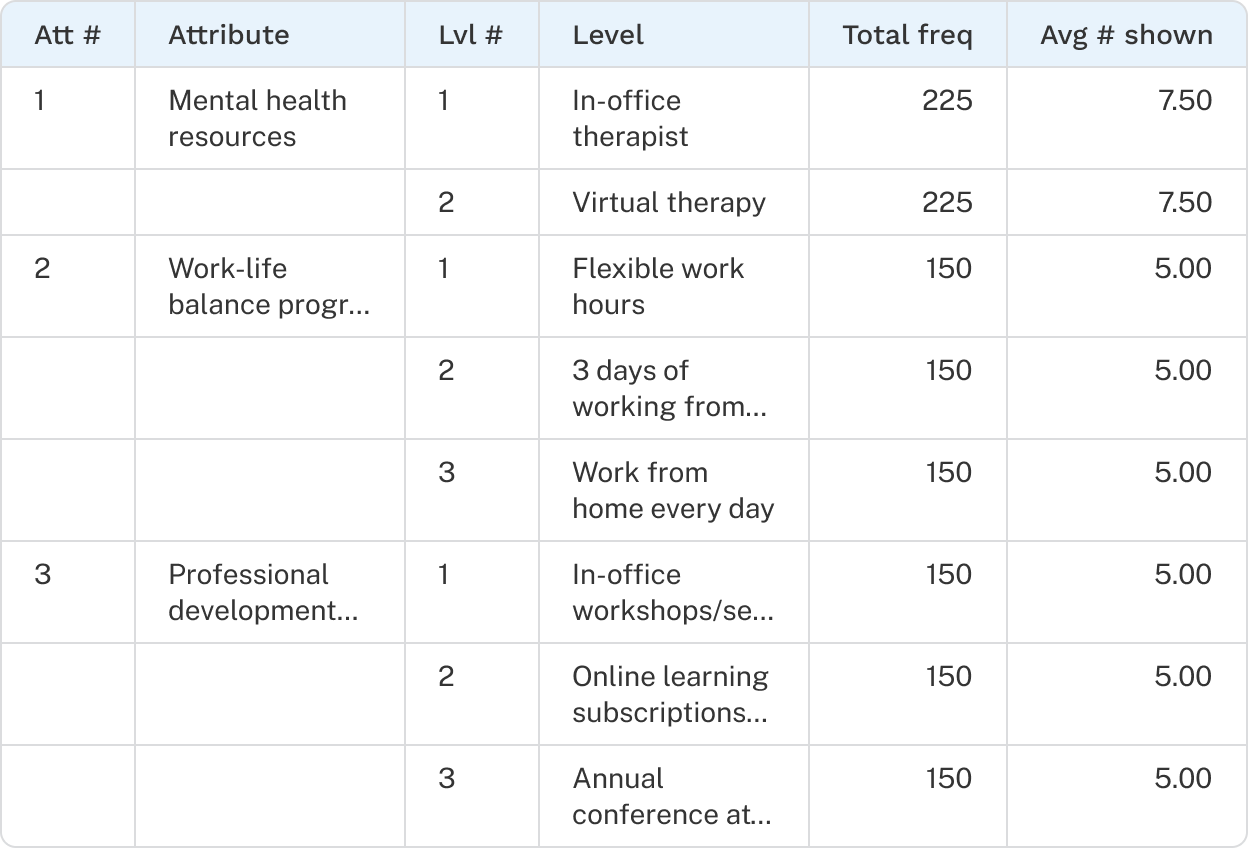
1-way level metrics

This table displays all attribute levels and their total frequency of occurrence across all versions, as well as the average frequency per version.

  • Rule of thumb: for accurate individual-level HB estimation, each level should appear about 6 times per respondent.
  • If the average number of times a level appears is below 4, a warning is triggered.
1 Way Level Metrics table

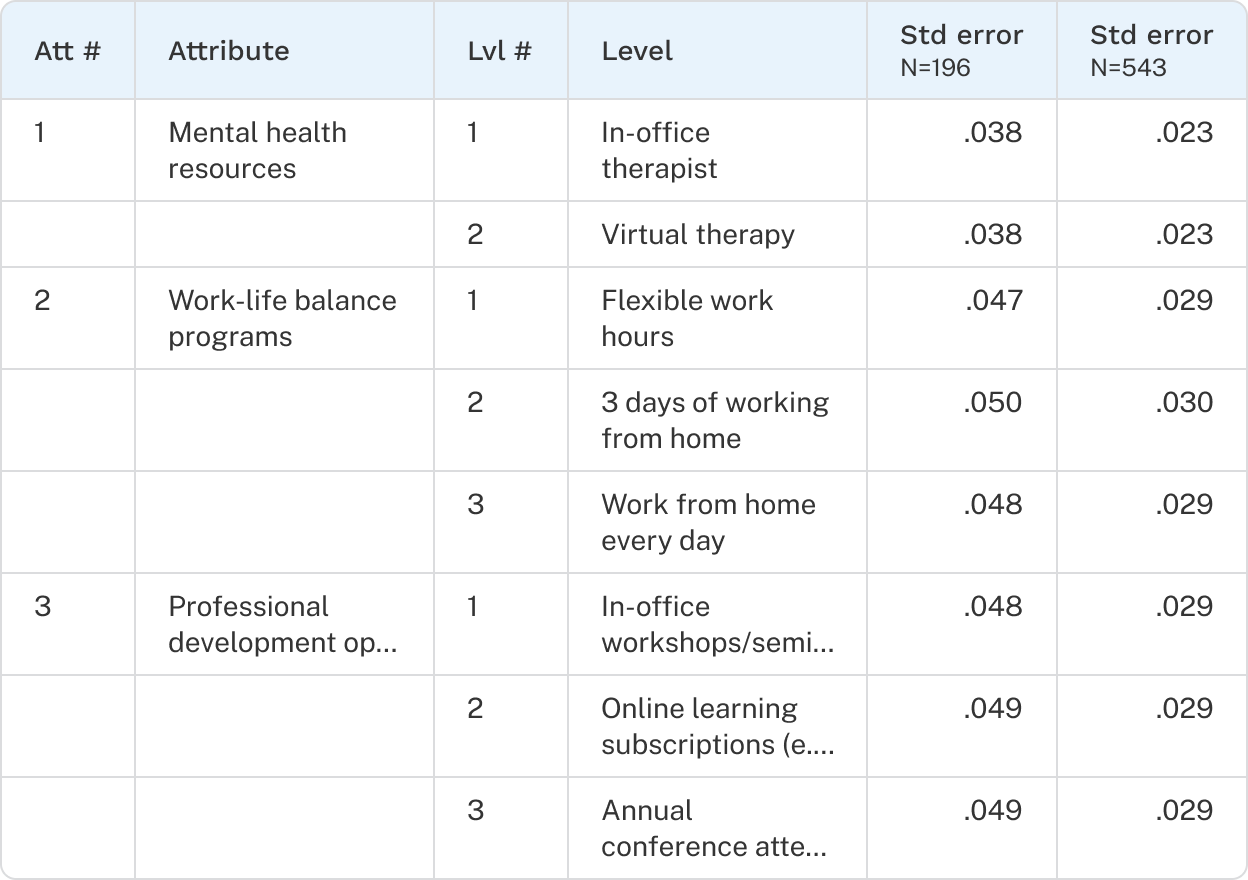
Standard errors

The report also includes standard errors, which reflect the precision of your utility estimates at the recommended sample size. You can include a Custom sample size for testing standard errors by clicking the settings icon at the top right of the table.

Suggested guidelines:

  • Standard errors within each attribute should be roughly equivalent.
  • Standard errors for main effects (attributes taken one at a time) should be ≤ 0.05.
  • Standard errors for nested attribute levels should be ≤ .1.
Standard errors table

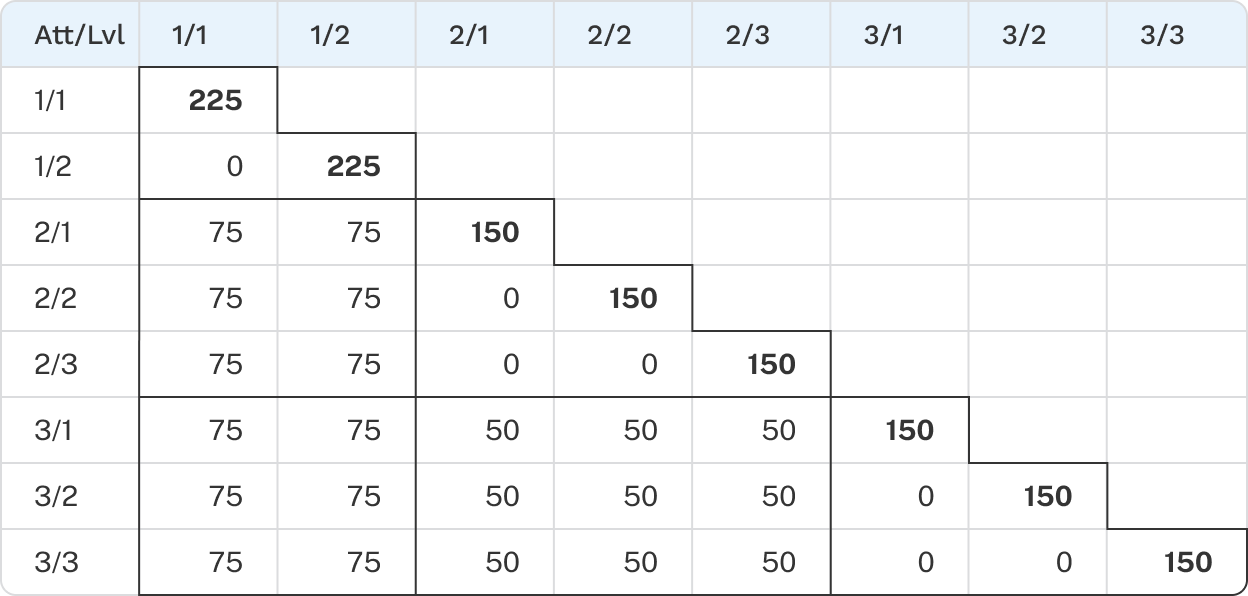
2-way frequency balance

This table shows the frequency with which each level of an attribute appears with each level of another attribute within the same concept.

  • Along the diagonal, you’ll see the one-way frequencies repeated.
  • With no prohibitions, two-way frequencies should be fairly balanced.
  • With prohibitions, achieving a perfect balance between one-way and two-way frequencies is not possible.
2 Way Frequency Balance table

1-way frequencies per version

This table shows how often each attribute level appears within each version.

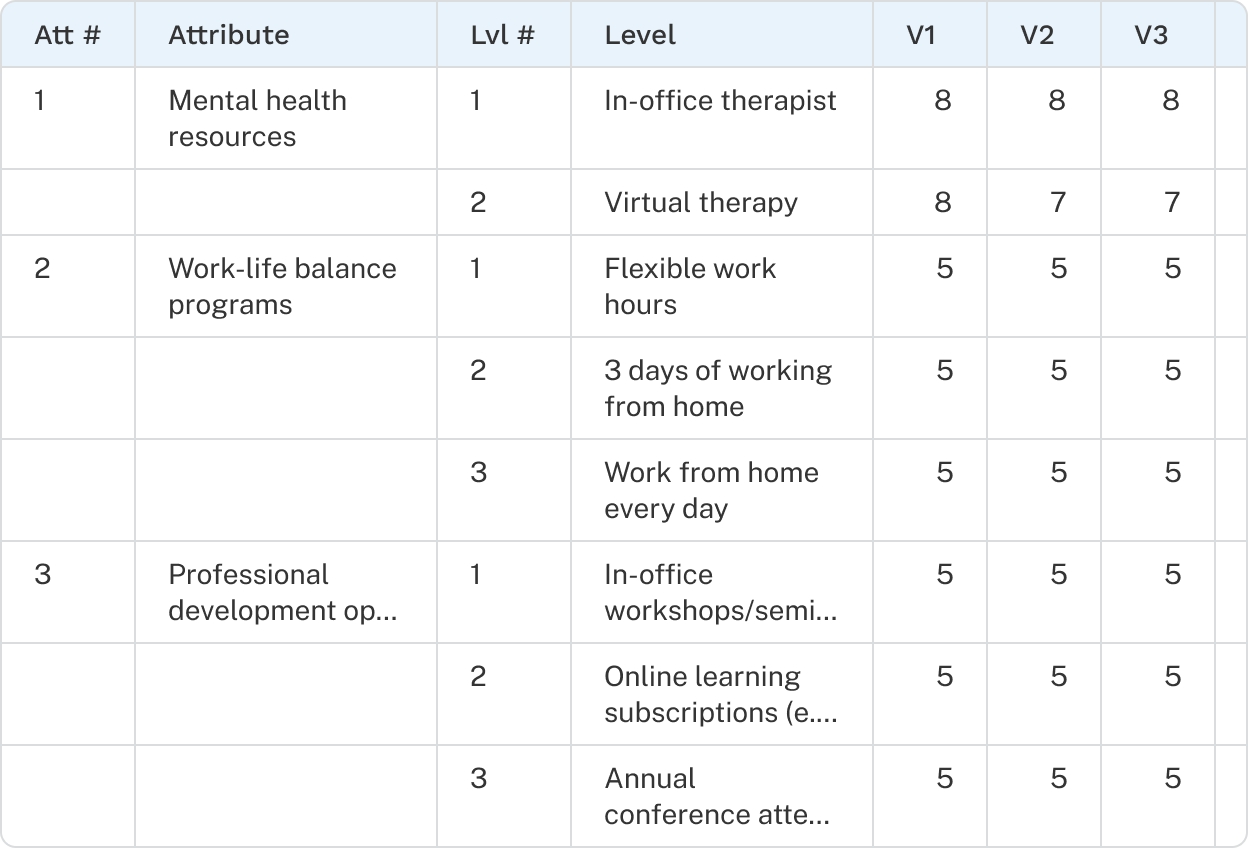
1 Way Frequencies Per Version table

What makes a good design

A good experimental design allows you to estimate utility scores for attribute levels with a high degree of precision. The experimental design, fueled by sample size, allows you to make reliable estimates of the population’s preferences.

Discover strives to make it nearly impossible for you to field a CBC study with an inadequate design. It does this by testing your design and verifying through a variety of checks that the utility effects will be estimable. That said, some designs are more efficient and precise than others, so you should study what to look for in excellent vs. less excellent designs.

Discover will only warn you if the design is starting to be poor, and will only stop you if the design is deficient. If you have followed typical guidelines for CBC experiments, you can be confident your design will be good. Those principles include:

  • A reasonable number of attributes and levels per attribute.
  • A reasonable number of tasks for each respondent.
  • A reasonable number of concepts within each task.
  • No or very few prohibitions between attributes.

Warning/Error conditions

Discover uses a variety of tests to ensure that your design is adequate. You may receive warnings or error messages if the following conditions occur:

  • Levels within each attribute don’t appear approximately an equal number of times.
  • Too many prohibitions are specified between two attributes.
  • A disproportionately large portion of the total design space has been prohibited.
  • The standard errors (from aggregate logit) are too large, given a modest sample size.

Resolving warnings and errors often comes down to reducing the number of prohibitions in your design or increasing the number of tasks per respondent.